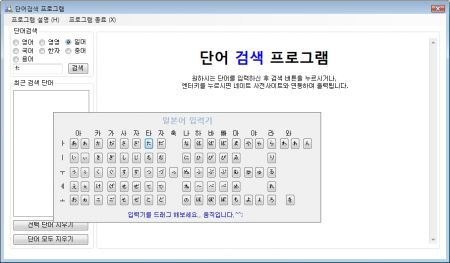
마우스 드래그로 패널(그림에서 보이시는 일본어 입력기가 패널로 그려저 있습니다.)을 폼상에서 이동하는 소스 코드 입니다.
private Point mCurrentPosition = new Point(0, 0);현재 패널에 위치를 저장하는 Point형 mCurrentPosition 을 생성합니다.
패널에서 MouseMove이벤트를 생성후 다음코드와 같이 작성합니다.
private void panel1_MouseMove(object sender, MouseEventArgs e)
        {
            if (e.Button == MouseButtons.Left)
            {
                p_japan_KeyInput.Location = new Point(p_japan_KeyInput.Location.X + (mCurrentPosition.X + e.X), p_japan_KeyInput.Location.Y + (mCurrentPosition.Y + e.Y));
            }
        }
그리고 MouseDown 이벤트로 생성후 다음코드와 같이 작성합니다. private void panel1_MouseDown(object sender, MouseEventArgs e)
{
base.OnMouseDown(e);
if (e.Button == MouseButtons.Left)
{
mCurrentPosition = new Point(-e.X, -e.Y);
}
}
마지막으로 DragEnter 이벤트를 생성후 다음과 같이 코드를 작성합니다.
private void panel1_DragEnter(object sender, DragEventArgs e)
        {
            if (e.Data.GetDataPresent(DataFormats.FileDrop))
            {
                e.Effect = DragDropEffects.All;
            }
            else
            {
                e.Effect = DragDropEffects.None;
            }
        }

