jQuery Mobile jQuery Mobile 페이지
First Page!
jQuery Mobile
jQuery Mobile
jQuery Mobile
- Posted
- Filed under 공부한 것들/기타
jQuery Example
jQuery Mobile jQuery Mobile 페이지
First Page!
jQuery Mobile
jQuery Mobile
jQuery Mobile


using System;
using System.Windows;
using System.IO.Ports;
using System.Windows.Threading;
using System.Windows.Interop;
using System.Runtime.InteropServices;

namespace Wpf_Serial
{
    ///
    /// MainWindow.xaml에 대한 상호 작용 논리
    ///
    public partial class MainWindow : Window
    {
        decimal LineNumber = 1;

        SerialPort SP = new SerialPort();

        public MainWindow()
        {
            InitializeComponent();
        }

        IntPtr WndProc(IntPtr hWnd, int nMsg, IntPtr wParam, IntPtr lParam, ref bool handled)
        {
            UInt32 WM_DEVICECHANGE = 0x0219;
            UInt32 DBT_DEVTUP_VOLUME = 0x02;
            UInt32 DBT_DEVICEARRIVAL = 0x8000;
            UInt32 DBT_DEVICEREMOVECOMPLETE = 0x8004;

            //디바이스 연결시
            if ((nMsg == WM_DEVICECHANGE) && (wParam.ToInt32() == DBT_DEVICEARRIVAL))
            {
                int devType = Marshal.ReadInt32(lParam, 4);

                if (devType == DBT_DEVTUP_VOLUME)
                {
                    GetSerialPort();
                }
            }

            //디바이스 연결 해제시...
            if((nMsg == WM_DEVICECHANGE) && (wParam.ToInt32() == DBT_DEVICEREMOVECOMPLETE))
            {
                int devType = Marshal.ReadInt32(lParam,4);
                if(devType == DBT_DEVTUP_VOLUME)
                {
                    GetSerialPort();
                }
            }

            return IntPtr.Zero;
        }

        private void Window_Loaded(object sender, RoutedEventArgs e)
        {
            WindowInteropHelper helper = new WindowInteropHelper(this);
            HwndSource source = HwndSource.FromHwnd(helper.Handle);
            source.AddHook(new HwndSourceHook(this.WndProc));

            SP.DataReceived += new SerialDataReceivedEventHandler(SP_DataReceived);
        }

        private void SP_DataReceived(object sender, SerialDataReceivedEventArgs e)
        {
            Dispatcher.Invoke(DispatcherPriority.Normal, new Action(delegate
            {
                string str = SP.ReadLine();
                textBox1.AppendText("[" + LineNumber++.ToString() + "] : " + str);
                textBox1.ScrollToEnd();
            }));
        }

        private void btnPortSearch_Click(object sender, RoutedEventArgs e)
        {
            GetSerialPort();
        }

        private void GetSerialPort()
        {
            lst_ComPort.Items.Clear();
            foreach (string comport in SerialPort.GetPortNames())
            {
                lst_ComPort.Items.Add(comport);
            }

            if (lst_ComPort.Items.Count <= 0)
            {
                lst_ComPort.Items.Add("찾을 수 없음");
            }
        }

        private void btnPortOpen_Click(object sender, RoutedEventArgs e)
        {
            if (SP.IsOpen)
            {

            }
            else
            {
                SP.Open();
            }
        }

        private void lst_ComPort_SelectionChanged(object sender, System.Windows.Controls.SelectionChangedEventArgs e)
        {
            SP.PortName = lst_ComPort.SelectedItem.ToString();
        }

        private void btnPortClose_Click(object sender, RoutedEventArgs e)
        {
            if (SP.IsOpen)
            {
                SP.Close();
            }
        }
    }
}
음 WPF에서 요 코드를 사용하기 전에 WindowsBase 항목을 참조를 해주어야 했던걸로 기억이 납니다..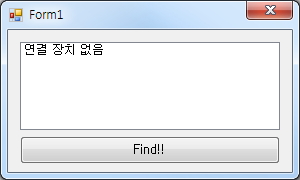
public partial class Form1 : Form
    {
        SerialPort sp = new SerialPort();

        public Form1()
        {
            InitializeComponent();
            GetSerialPort();
        }

        protected override void WndProc(ref Message m)
        {
            UInt32 WM_DEVICECHANGE = 0x0219;
            UInt32 DBT_DEVTUP_VOLUME = 0x02;
            UInt32 DBT_DEVICEARRIVAL = 0x8000;
            UInt32 DBT_DEVICEREMOVECOMPLETE = 0x8004;

            if ((m.Msg == WM_DEVICECHANGE) && (m.WParam.ToInt32() == DBT_DEVICEARRIVAL))//디바이스 연결
            {
                //int m_Count = 0;
                int devType = Marshal.ReadInt32(m.LParam, 4);

                if (devType == DBT_DEVTUP_VOLUME)
                {
                    GetSerialPort();
                }
            }

            if((m.Msg == WM_DEVICECHANGE) &&(m.WParam.ToInt32()  == DBT_DEVICEREMOVECOMPLETE))  //디바이스 연결 해제
            {
                int devType = Marshal.ReadInt32(m.LParam, 4);
                if (devType == DBT_DEVTUP_VOLUME)
                {
                    GetSerialPort();
                }
            }

            base.WndProc(ref m);
        }

        private void button1_Click(object sender, EventArgs e)
        {
            try
            {
                GetSerialPort();
            }
            catch (Exception ex)
            {
                MessageBox.Show(ex.Message);
            }
        }

        private void GetSerialPort()
        {
            listBox1.Items.Clear();

            try
            {
                foreach (string str in SerialPort.GetPortNames())
                {
                    listBox1.Items.Add(str);
                }
                if (listBox1.Items.Count <= 0)
                {
                    listBox1.Items.Add("연결 장치 없음");
                }
            }
            catch (Exception ex)
            {
                MessageBox.Show(ex.Message);
            }
        }
    }
연결/연결해제가 되면 이를 감지하여 시리얼 포트 장치를 재 검색해주도록 하고 있습니다.
예제는 소스 코드를 가지고 응용해 보시면 될듯 합니다...